
What do we hear most often from people who’ve tried Notion? That it’s complex. And since September 2025, Notion has made things a little more complex with the introduction of data sources. Let’s break down the difference between databases and data sources, and how this affects integrations (like those using Make).
What was it like before September 2025?
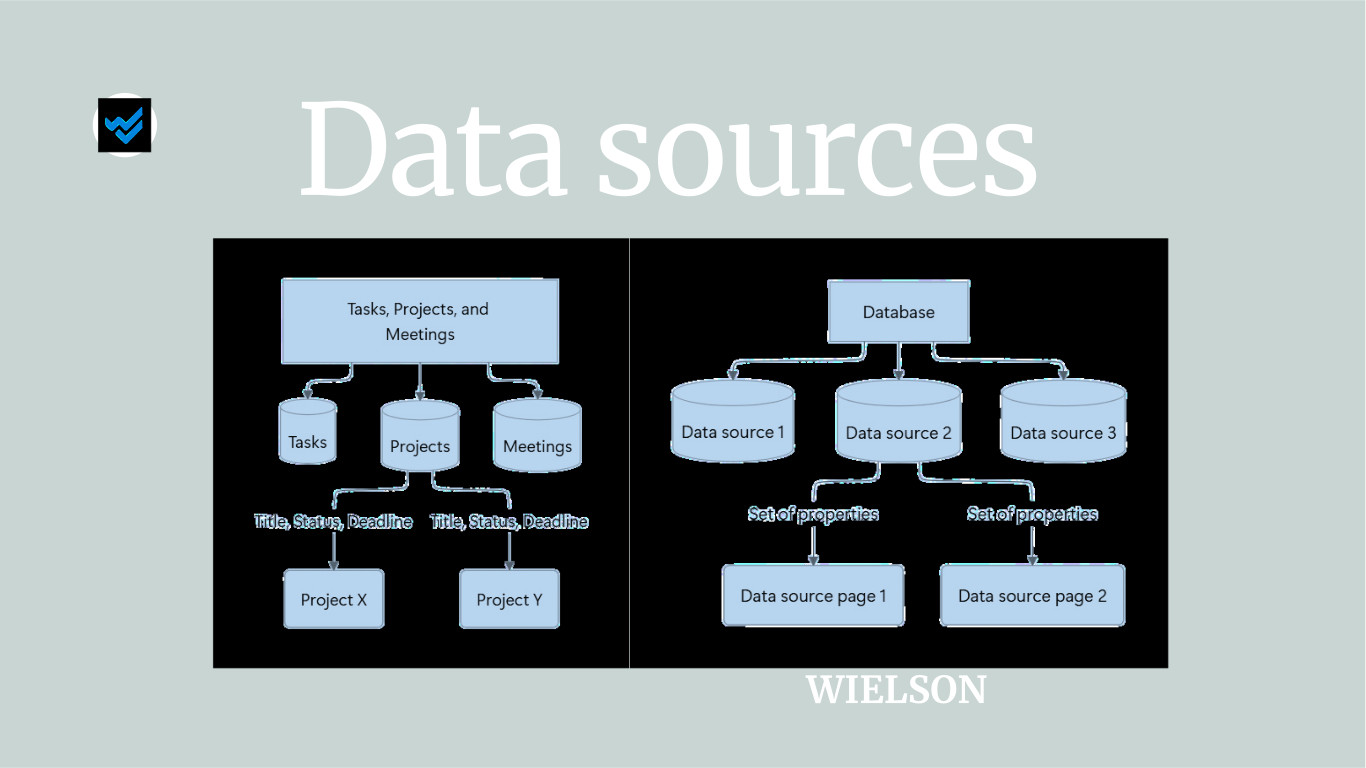
Databases have been the backbone of a Notion workspace. By default, they appear as tables and contain a title, properties, and database items (pages).
Until 3 September 2025, a database had exactly one data source – a one-to-one relationship. That’s why the term "data source" wasn’t used or visible to users.


What’s changed now?
Since September 2025, databases can contain multiple data sources. This means there’s now a clear distinction between the terms database and data source.
A database now refers to the container holding one or more data sources.
Where we used to say “database”, we’re now talking about a “data source”.


What does this change?
For most users, not much changes. You can still stick to a 1:1 setup—one data source per database—just like before. We call this a single-source database.
Creating a data source
To create a new data source or database (e.g. a tasks database), you can still type /database.
This opens a menu where you can choose the database format you want.


Deleting a database or data source
You can delete a database (with one or more data sources), as well as a data source.
Some examples:

You can delete a database containing one data source (one-to-one).

You can delete a database containing two (or more) data sources.

You can delete a data source view. The data source and its pages still exist.
If you delete the only view of a data source, the data source and its pages still exist, but become invisible unless you add a new view.
Under the database settings, you can manage your data sources and see how many views each has. In the example below you can see that there are no views of ‘Data source’, yet the data source has not been deleted.


Permissions
Access rights are managed at the database level.
You can’t set different permissions for data sources within the same database. So, if you need one data source with separate access, you need to move it to another database or page.
API and Integrations
At first glance, nothing changes. But if you’re using integrations, we recommend switching to API version 2025‑09‑03.
This version supports multi–data source databases, but also works with single–data source ones.
Where to find the IDs?
- Database ID: Found in the URL (use CTRL/CMD + L)
- Data Source ID: Go to database settings > ‘Manage data sources’ > ‘Copy data source ID’
https://www.notion.so/name_workspace/12ab345c67d89e01fg234567h8912300?v=148104cd477e80bb928f000ce197ddf2

Using Make
How does this update affect Make?

You can still use the existing database modules, but we recommend switching to the new data source modules.
Why? As soon as you use a database with multiple data sources, the old database modules stop working.
Update your “Make an API Call” modules to use version 2025‑09‑03. The older v1 version will eventually be phased out.
Don’t forget to check your Notion webhooks too. The parent.type output might have changed.

Conclusion
You can safely continue working with your "old" databases—where one database equals one data source. This is the easiest and safest option. If you use integrations or automations (like Make), it’s best to review and update them.
For more info, check out these resources:
Got questions or feedback? Let us know!